Friday, March 11, 2011

Chèn các kênh truyền hình trực tuyến vào blog

Code chèn các kênh truyền hình trực tuyến vào blog mà không cần code phức tạp chỉ cần chèn frame

<iframe src="http://fun.easyvn.com/_easyweb/web/design/tivi1.php" frameborder="0" width="450" height="450"></iframe>

Chèn các kênh truyền hình trực tuyến vào blog

Code chèn các kênh truyền hình trực tuyến vào blog mà không cần code phức tạp chỉ cần chèn frame

<iframe src="http://fun.easyvn.com/_easyweb/web/design/tivi1.php" frameborder="0" width="450" height="450"></iframe>

Chèn thông tin chứng khoán vào blog

Code chèn thông tin chứng khoán vào blog

<p align="center"><table width="180">


<table border="1" cellpadding="0" cellspacing="0" width="180">


<tbody>


<tr>


<td rowspan="2" width="17%" align="center"> <font face="Arial"> <span>Mã CK </span> </font> </td>


<td rowspan="2" width="18%" align="center"> <font face="Arial"> <span>TC</span></font></td>


<td colspan="2" height="23%" align="center"> <font face="Arial"> <span>Khớp lệnh </span> </font> </td>


<td rowspan="2" width="22%" align="center"> <font face="Arial"> <span>+/-</span></font></td></tr>


<tr>


<td width="21%" align="center"> <font face="Arial"> <span>Giá</span></font></td>


<td width="22%" height="20" align="center"> <font face="Arial"> <span>KL</span></font></td></tr>


<tr>


<td colspan="5" height="20" align="center"><font face="Arial"> <span>


<iframe scrolling="no" frameborder="0" width="180" src="http://vnexpress.net/User/ck/hcms/HCMStockSmall.asp" name="ifrmContent" height="200"></iframe> <br/>


</span></font></td></tr>


</tbody></table></table></p>
Chèn thông tin chứng khoán vào blog

Code chèn thông tin chứng khoán vào blog

<p align="center"><table width="180">


<table border="1" cellpadding="0" cellspacing="0" width="180">


<tbody>


<tr>


<td rowspan="2" width="17%" align="center"> <font face="Arial"> <span>Mã CK </span> </font> </td>


<td rowspan="2" width="18%" align="center"> <font face="Arial"> <span>TC</span></font></td>


<td colspan="2" height="23%" align="center"> <font face="Arial"> <span>Khớp lệnh </span> </font> </td>


<td rowspan="2" width="22%" align="center"> <font face="Arial"> <span>+/-</span></font></td></tr>


<tr>


<td width="21%" align="center"> <font face="Arial"> <span>Giá</span></font></td>


<td width="22%" height="20" align="center"> <font face="Arial"> <span>KL</span></font></td></tr>


<tr>


<td colspan="5" height="20" align="center"><font face="Arial"> <span>


<iframe scrolling="no" frameborder="0" width="180" src="http://vnexpress.net/User/ck/hcms/HCMStockSmall.asp" name="ifrmContent" height="200"></iframe> <br/>


</span></font></td></tr>


</tbody></table></table></p>

Chèn ô comment ngay dưới bài viết

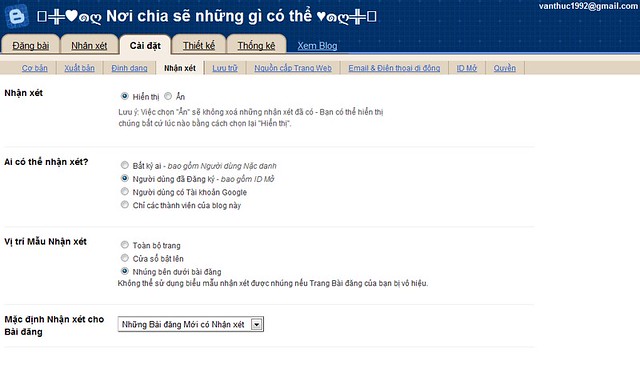
Trước tiên hãy vào http://draft.blogger.com trong phần Cài đặt ,mở tab Nhận Xét


sau đó chọn vào Bài đăng dưới đây đã được nhúng trong phần Vị trí Mẫu Nhận Xét
imageSau đó lưu lại là xong bây giờ bảng comment đã xuất hiện trong blog của bạn rồi đó .
Còn nếu chưa xuất hiện nữa thì bạn hãy vào Chỉnh Sửa HTML ( nhớ lưu lại template phòng trường hợp bị hư còn có thể phục hồi ) , chọn Mở Rộng Mẫu Tiện Ích , rồi kiếm dòng :
<p class='comment-footer'> 
<b:if cond='data:post.allowComments'>
<a expr:href='data:post.addCommentUrl'
expr:onclick='data:post.addCommentOnclick'>
<data:postCommentMsg/></a> </b:if> </p>


thay thế toàn bộ những dòng đó bằng :


<p class='comment-footer'>
<b:if cond='data:post.embedCommentForm'>
<b:include data='post' name='comment-form'/>
<b:else/>
<b:if cond='data:post.allowComments'>
<a expr:href='data:post.addCommentUrl' expr:onclick='data:post.addCommentOnclick'><data:postCommentMsg/></a>
</b:if>
</b:if>
</p>


Sau đó nhấp vào Lưu Mẫu và mở blog bạn lên để xem kết quả .


Còn nếu không được nữa thì hãy tìm dòng sau :

<b:include data='post' name='comments' />

thay thế bằng :

<b:include data='post' name='comment-form'/>


Cuối cùng là lưu lại . Chúc bạn thành công

Chèn ô comment ngay dưới bài viết

Trước tiên hãy vào http://draft.blogger.com trong phần Cài đặt ,mở tab Nhận Xét


sau đó chọn vào Bài đăng dưới đây đã được nhúng trong phần Vị trí Mẫu Nhận Xét
imageSau đó lưu lại là xong bây giờ bảng comment đã xuất hiện trong blog của bạn rồi đó .
Còn nếu chưa xuất hiện nữa thì bạn hãy vào Chỉnh Sửa HTML ( nhớ lưu lại template phòng trường hợp bị hư còn có thể phục hồi ) , chọn Mở Rộng Mẫu Tiện Ích , rồi kiếm dòng :
<p class='comment-footer'> 
<b:if cond='data:post.allowComments'>
<a expr:href='data:post.addCommentUrl'
expr:onclick='data:post.addCommentOnclick'>
<data:postCommentMsg/></a> </b:if> </p>


thay thế toàn bộ những dòng đó bằng :


<p class='comment-footer'>
<b:if cond='data:post.embedCommentForm'>
<b:include data='post' name='comment-form'/>
<b:else/>
<b:if cond='data:post.allowComments'>
<a expr:href='data:post.addCommentUrl' expr:onclick='data:post.addCommentOnclick'><data:postCommentMsg/></a>
</b:if>
</b:if>
</p>


Sau đó nhấp vào Lưu Mẫu và mở blog bạn lên để xem kết quả .


Còn nếu không được nữa thì hãy tìm dòng sau :

<b:include data='post' name='comments' />

thay thế bằng :

<b:include data='post' name='comment-form'/>


Cuối cùng là lưu lại . Chúc bạn thành công

Tạo “mưa tuyết” bằng JavaScript

Bạn muốn thấy cảnh mưa tuyết rơi rơi trên trang Web của mình? Xin mời bạn “xắn tay áo” và gõ vào máy đoạn mã JavaScript sau đây (bạn nhớ lưu thành dạng văn bản có phần mở rộng là .html). Các bông tuyết được vẽ bằng công cụ Airbrush trong Microsoft Paint, kích thước 10x10 pixel, lưu thành tập tin blue_snow.gif. Chương trình có thể chạy được trên cả Internet Explorer 4.0 và Netscape Navigator 4.0 trở lên.

PHP Code:
<html>
<head> <title> Mua tuyet </title> </head>
<body> <center>
<SCRIPT LANGUAGE="JavaScript1.2">
<!-- Begin
var no = 25; var speed = 10;
var snowflake = "blue_snow.gif";
var ns4up = (document.layers) ? 1 : 0;
var ie4up = (document.all) ? 1 : 0;
var dx, xp, yp; var am, stx, sty;
var i, doc_width = 800, doc_height = 600;
if (ns4up) {
doc_width = self.innerWidth;
doc_height = self.innerHeight;
} else if (ie4up) {
doc_width = document.body.clientWidth;
doc_height = document.body.clientHeight;
}
dx = new Array(); xp = new Array();
yp = new Array(); am = new Array();
stx = new Array(); sty = new Array();
for (i = 0; i < no; ++ i) {
dx[i] = 0;
xp[i] = Math.random()*(doc_width-50);
yp[i] = Math.random()*doc_height;
am[i] = Math.random()*20;
stx[i] = 0.02 + Math.random()/10;
sty[i] = 0.7 + Math.random();
if (ns4up) {
if (i == 0) {
document.write("<layer name=\"dot"+ i +"\" left=\"15\" ");
document.write("top=\"15\" visibility=\"show\"><img src=\"");
document.write(snowflake + "\" border=\"0\"></layer>");
} else {
document.write("<layer name=\"dot"+ i +"\" left=\"15\" ");
document.write("top=\"15\" visibility=\"show\"><img src=\"");
document.write(snowflake + "\" border=\"0\"></layer>");
}
} else if (ie4up) {
if (i == 0) {
document.write("<div id=\"dot"+ i +"\" style=\"POSITION: ");
document.write("absolute; Z-INDEX: "+ i +"; VISIBILITY: ");
document.write("visible; TOP: 15px; LEFT: 15px;\"><img src=\"");
document.write(snowflake + "\" border=\"0\"></div>");
} else {
document.write("<div id=\"dot"+ i +"\" style=\"POSITION: ");
document.write("absolute; Z-INDEX: "+ i +"; VISIBILITY: ");
document.write("visible; TOP: 15px; LEFT: 15px;\"><img src=\"");
document.write(snowflake + "\" border=\"0\"></div>");
}
}
}
function snowNS() {
for (i = 0; i < no; ++ i) {
yp[i] += sty[i];
if (yp[i] > doc_height-50) {
xp[i] = Math.random()*(doc_width-am[i]-30);
yp[i] = 0;
stx[i] = 0.02 + Math.random()/10;
sty[i] = 0.7 + Math.random();
doc_width = self.innerWidth;
doc_height = self.innerHeight;
}
dx[i] += stx[i];
document.layers["dot"+i].top = yp[i];
document.layers["dot"+i].left = xp[i] + am[i]*Math.sin(dx[i]);
}
setTimeout("snowNS()", speed);
}
function snowIE() {
for (i = 0; i < no; ++ i) {
yp[i] += sty[i];
if (yp[i] > doc_height-50) {
xp[i] = Math.random()*(doc_width-am[i]-30);
yp[i] = 0;
stx[i] = 0.02 + Math.random()/10;
sty[i] = 0.7 + Math.random();
doc_width = document.body.clientWidth;
doc_height = document.body.clientHeight;
}
dx[i] += stx[i];
document.all["dot"+i].style.pixelTop = yp[i];
document.all["dot"+i].style.pixelLeft = xp[i] + am[i]*Math.sin(dx[i]);
}
setTimeout("snowIE()", speed);
}
if (ns4up) {
snowNS();
} else if (ie4up) {
snowIE();
}
// End -->
</script> </body>
</html> 
( theo Internet)

Tạo “mưa tuyết” bằng JavaScript

Bạn muốn thấy cảnh mưa tuyết rơi rơi trên trang Web của mình? Xin mời bạn “xắn tay áo” và gõ vào máy đoạn mã JavaScript sau đây (bạn nhớ lưu thành dạng văn bản có phần mở rộng là .html). Các bông tuyết được vẽ bằng công cụ Airbrush trong Microsoft Paint, kích thước 10x10 pixel, lưu thành tập tin blue_snow.gif. Chương trình có thể chạy được trên cả Internet Explorer 4.0 và Netscape Navigator 4.0 trở lên.

PHP Code:
<html>
<head> <title> Mua tuyet </title> </head>
<body> <center>
<SCRIPT LANGUAGE="JavaScript1.2">
<!-- Begin
var no = 25; var speed = 10;
var snowflake = "blue_snow.gif";
var ns4up = (document.layers) ? 1 : 0;
var ie4up = (document.all) ? 1 : 0;
var dx, xp, yp; var am, stx, sty;
var i, doc_width = 800, doc_height = 600;
if (ns4up) {
doc_width = self.innerWidth;
doc_height = self.innerHeight;
} else if (ie4up) {
doc_width = document.body.clientWidth;
doc_height = document.body.clientHeight;
}
dx = new Array(); xp = new Array();
yp = new Array(); am = new Array();
stx = new Array(); sty = new Array();
for (i = 0; i < no; ++ i) {
dx[i] = 0;
xp[i] = Math.random()*(doc_width-50);
yp[i] = Math.random()*doc_height;
am[i] = Math.random()*20;
stx[i] = 0.02 + Math.random()/10;
sty[i] = 0.7 + Math.random();
if (ns4up) {
if (i == 0) {
document.write("<layer name=\"dot"+ i +"\" left=\"15\" ");
document.write("top=\"15\" visibility=\"show\"><img src=\"");
document.write(snowflake + "\" border=\"0\"></layer>");
} else {
document.write("<layer name=\"dot"+ i +"\" left=\"15\" ");
document.write("top=\"15\" visibility=\"show\"><img src=\"");
document.write(snowflake + "\" border=\"0\"></layer>");
}
} else if (ie4up) {
if (i == 0) {
document.write("<div id=\"dot"+ i +"\" style=\"POSITION: ");
document.write("absolute; Z-INDEX: "+ i +"; VISIBILITY: ");
document.write("visible; TOP: 15px; LEFT: 15px;\"><img src=\"");
document.write(snowflake + "\" border=\"0\"></div>");
} else {
document.write("<div id=\"dot"+ i +"\" style=\"POSITION: ");
document.write("absolute; Z-INDEX: "+ i +"; VISIBILITY: ");
document.write("visible; TOP: 15px; LEFT: 15px;\"><img src=\"");
document.write(snowflake + "\" border=\"0\"></div>");
}
}
}
function snowNS() {
for (i = 0; i < no; ++ i) {
yp[i] += sty[i];
if (yp[i] > doc_height-50) {
xp[i] = Math.random()*(doc_width-am[i]-30);
yp[i] = 0;
stx[i] = 0.02 + Math.random()/10;
sty[i] = 0.7 + Math.random();
doc_width = self.innerWidth;
doc_height = self.innerHeight;
}
dx[i] += stx[i];
document.layers["dot"+i].top = yp[i];
document.layers["dot"+i].left = xp[i] + am[i]*Math.sin(dx[i]);
}
setTimeout("snowNS()", speed);
}
function snowIE() {
for (i = 0; i < no; ++ i) {
yp[i] += sty[i];
if (yp[i] > doc_height-50) {
xp[i] = Math.random()*(doc_width-am[i]-30);
yp[i] = 0;
stx[i] = 0.02 + Math.random()/10;
sty[i] = 0.7 + Math.random();
doc_width = document.body.clientWidth;
doc_height = document.body.clientHeight;
}
dx[i] += stx[i];
document.all["dot"+i].style.pixelTop = yp[i];
document.all["dot"+i].style.pixelLeft = xp[i] + am[i]*Math.sin(dx[i]);
}
setTimeout("snowIE()", speed);
}
if (ns4up) {
snowNS();
} else if (ie4up) {
snowIE();
}
// End -->
</script> </body>
</html> 
( theo Internet)

Tạo chữ đẹp chèn vào blog hoặc làm chữ ký

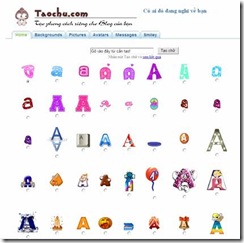
Hiện tại các trang nước ngoài cung cấp dịch vụ này rất nhiều , nhưng taochu.com là một trang hoàn toàn bằng Tiếng Việt , do đó rất dễ sử dụng và phù hợp với người Việt Nam chúng ta .


clip_image002

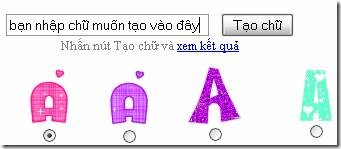
Để tạo chữ bạn chỉ cần chọn kiểu chữ ( có rất nhiều kiểu chữ để bạn tha hồ lựa chọn ) rồi điền chữ mình muốn tạo vào khung tạo chữ (không ghi được Tiếng Việt có dấu ) và cuối cùng là bấm vào nút Tạo chữ để lấy mã dán vào blog là xong là xong .

clip_image004

Không những cung cấp những kiểu chữ đẹp trang web còn cung câp thêm những :
Backgrounds : tuyệt đẹp với những chủ đề như Cute , Dark , Flowers , Heart , Patiern , Star với hàng trăm hình nền tuyệt đẹp
Pictures : với các chủ đề như colors , cute girl , happy , lonely , love , rain , sad , snow , sweet , hấp dẫn người xem .
Avatars : một kho những avatar tuyệt đẹp , hút hồn người xem
Messages : những tin nhắn đầy cảm xúc trong những background lãng mạn
Smiley : biểu tượng mặt cười ngỗ nghĩnh dễ thương , sẽ khiến bạn phải “chảy nước mắt” hay đau bụng vì cười quá nhiều .
Hấp dẫn quá phải không nào , hãy thử đi nhé 

Tạo chữ đẹp chèn vào blog hoặc làm chữ ký

Hiện tại các trang nước ngoài cung cấp dịch vụ này rất nhiều , nhưng taochu.com là một trang hoàn toàn bằng Tiếng Việt , do đó rất dễ sử dụng và phù hợp với người Việt Nam chúng ta .


clip_image002

Để tạo chữ bạn chỉ cần chọn kiểu chữ ( có rất nhiều kiểu chữ để bạn tha hồ lựa chọn ) rồi điền chữ mình muốn tạo vào khung tạo chữ (không ghi được Tiếng Việt có dấu ) và cuối cùng là bấm vào nút Tạo chữ để lấy mã dán vào blog là xong là xong .

clip_image004

Không những cung cấp những kiểu chữ đẹp trang web còn cung câp thêm những :
Backgrounds : tuyệt đẹp với những chủ đề như Cute , Dark , Flowers , Heart , Patiern , Star với hàng trăm hình nền tuyệt đẹp
Pictures : với các chủ đề như colors , cute girl , happy , lonely , love , rain , sad , snow , sweet , hấp dẫn người xem .
Avatars : một kho những avatar tuyệt đẹp , hút hồn người xem
Messages : những tin nhắn đầy cảm xúc trong những background lãng mạn
Smiley : biểu tượng mặt cười ngỗ nghĩnh dễ thương , sẽ khiến bạn phải “chảy nước mắt” hay đau bụng vì cười quá nhiều .
Hấp dẫn quá phải không nào , hãy thử đi nhé 

Chèn lịch Việt Nam vào blog

Bạn có thể chèn lich Việt Nam , kể cả âm lịch vào blog của mình mà không cần qua dịch vụ trung gian nào hết , bằng cách chép đoạn code này vào blog


<center><a name="amlich"></a>

<script language="JavaScript" src="http://mangvn.org/nukeviet/js/amlich.js" type="text/javascript"></script>
<script language="JavaScript">showVietCal();</script>
<script language="JavaScript">document.writeln(printSelectedMonth()); </script>
<table border="0" width="100%" style="border-collapse: collapse; font-size: 10 px; color: black; font-family: verdana">
<tr>
<td align="center">
<form name="SelectMonth" action="#amlich"">
Tháng <select name="
month"><option value="1">1<option value="2">2<option value="3">3<option value="4">4<option value="5">5<option value="6">6<option value="7">7<option value="8">8<option value="9">9<option value="10">10<option value="11">11<option value="12">12</select>

<input type="
button" value="Xem" onClick="javascript:viewMonth(parseInt(month.value), parseInt(year.value));"><br>
Năm&nbsp; <INPUT NAME="
year" size=4 value="2005">
<input type="
button" value="Xem" onClick="javascript:viewYear(parseInt(year.value));">
</form>
</td>
</tr>
</table>


s" type="text/javascript"></script>
<script language="JavaScript">showVietCal();</script>
<script language="JavaScript">document.writeln(printSelectedMonth()); </script>
<table border="0" width="100%" style="border-collapse: collapse; font-size: 10 px; color: black; font-family: verdana">
<tr>
<td align="center">
<form name="SelectMonth" action="#amlich"">
Tháng <select name="
month"><option value="1">1<option value="2">2<option value="3">3<option value="4">4<option value="5">5<option value="6">6<option value="7">7<option value="8">8<option value="9">9<option value="10">10<option value="11">11<option value="12">12</select>

<input type="
button" value="Xem" onClick="javascript:viewMonth(parseInt(month.value), parseInt(year.value));"><br>
Năm&nbsp; <INPUT NAME="
year" size=4 value="2005">
<input type="
button" value="Xem" onClick="javascript:viewYear(parseInt(year.value));">
</form>
</td>
</tr>
</table>


Trong đó đoạn in đậm màu đỏ là địa chỉ của file js cần dùng , bạn có thể download file js đó theo địa chỉ như trên rồi sau đó up lên một dịch vụ lưu trữ nào đó để khỏi phải sợ file bị di chuyển 

Chèn lịch Việt Nam vào blog

Bạn có thể chèn lich Việt Nam , kể cả âm lịch vào blog của mình mà không cần qua dịch vụ trung gian nào hết , bằng cách chép đoạn code này vào blog


<center><a name="amlich"></a>

<script language="JavaScript" src="http://mangvn.org/nukeviet/js/amlich.js" type="text/javascript"></script>
<script language="JavaScript">showVietCal();</script>
<script language="JavaScript">document.writeln(printSelectedMonth()); </script>
<table border="0" width="100%" style="border-collapse: collapse; font-size: 10 px; color: black; font-family: verdana">
<tr>
<td align="center">
<form name="SelectMonth" action="#amlich"">
Tháng <select name="
month"><option value="1">1<option value="2">2<option value="3">3<option value="4">4<option value="5">5<option value="6">6<option value="7">7<option value="8">8<option value="9">9<option value="10">10<option value="11">11<option value="12">12</select>

<input type="
button" value="Xem" onClick="javascript:viewMonth(parseInt(month.value), parseInt(year.value));"><br>
Năm&nbsp; <INPUT NAME="
year" size=4 value="2005">
<input type="
button" value="Xem" onClick="javascript:viewYear(parseInt(year.value));">
</form>
</td>
</tr>
</table>


s" type="text/javascript"></script>
<script language="JavaScript">showVietCal();</script>
<script language="JavaScript">document.writeln(printSelectedMonth()); </script>
<table border="0" width="100%" style="border-collapse: collapse; font-size: 10 px; color: black; font-family: verdana">
<tr>
<td align="center">
<form name="SelectMonth" action="#amlich"">
Tháng <select name="
month"><option value="1">1<option value="2">2<option value="3">3<option value="4">4<option value="5">5<option value="6">6<option value="7">7<option value="8">8<option value="9">9<option value="10">10<option value="11">11<option value="12">12</select>

<input type="
button" value="Xem" onClick="javascript:viewMonth(parseInt(month.value), parseInt(year.value));"><br>
Năm&nbsp; <INPUT NAME="
year" size=4 value="2005">
<input type="
button" value="Xem" onClick="javascript:viewYear(parseInt(year.value));">
</form>
</td>
</tr>
</table>


Trong đó đoạn in đậm màu đỏ là địa chỉ của file js cần dùng , bạn có thể download file js đó theo địa chỉ như trên rồi sau đó up lên một dịch vụ lưu trữ nào đó để khỏi phải sợ file bị di chuyển